Stage 16: create a product report with an optional confirmation message
Reused: constructor injection. New: optional setter injection.
New class in this stage: ReportService. Stage 15 had ProductService; it did not have ReportService. We now write ReportService to prepare the product report: obtain the count from the existing ProductService and, when available, obtain a display message from a helper called Notifier. These are names we chose for our Java classes, not Spring keywords.
We reuse constructor injection for the required ProductService. We introduce optional setter injection for Notifier: the report must work even when no Notifier bean is registered. Registration and injection are different decisions; the walkthrough below separates them.
Continue the Stage 15 product application. The @Bean factory method from Stage 12 registers the helper. Only optional setter injection is the new mechanism needed to run this stage.
Continue the Stage 15 catalog. Open a product report showing Total products: 30, with a confirmation banner when its helper is registered.
Open this stage in the online learning path
Before you start
Use JDK 21 or newer and Maven 3.9 or newer. Verify with java -version and mvn -version. Extract this project into its own folder; do not merge its files with another stage.
Continue the Stage 15 product catalog. Begin with the report requirement and illustration, then follow the highlighted file changes.
The practical requirement
Add a Generate product report link to the existing products page. The report shows the same product count. When a confirmation helper is registered, show its message below the count. The report itself must remain available when that helper is absent.
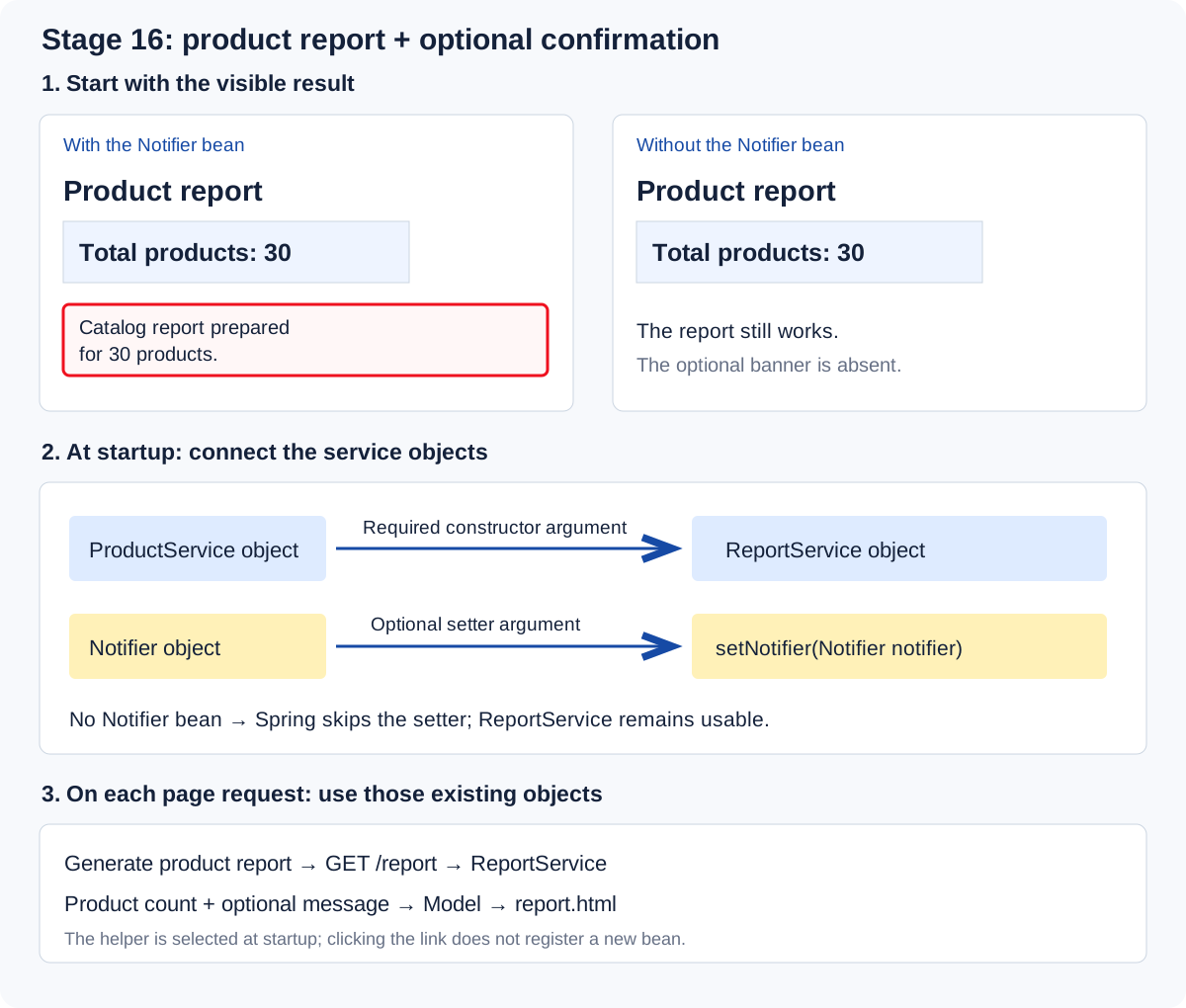
Meet the new classes before reading their wiring
A service is a Java class with a particular responsibility. Adding @Service lets component scanning register it as a Spring bean. Spring does not supply a built-in ReportService for us.
| Class | Responsibility in this project |
|---|---|
| ProductService — reused | Handles product operations and supplies count(). |
| ReportService — new | productCount() asks ProductService for the count. message() asks the optional Notifier for text, or returns an empty string when the helper is absent. |
| Notifier — new | message(30) returns the string “Catalog report prepared for 30 products.” It only prepares display text. |
| ReportController — new | Receives /report, obtains the report values and puts them in Model. |
| report.html — new template | Displays those values, including the banner only when its message is nonempty. |
What does the confirmation confirm? In this small demonstration it simply says the report page was prepared. Notifier sends no email, saves no bill and contacts no other person. The name describes our helper; it does not add notification capabilities. A separate ReportService is a design choice, not a requirement imposed by Spring.
Why might a real dependency be optional? A shared order application might record monitoring counts when a metrics collector is configured in production, yet process orders without that collector in a local installation. The core operation is still useful without the extra capability. Our banner is a small visible demonstration of that relationship, not a reason by itself to build a notification subsystem.
Two decisions: register a bean, then inject it
- Registration: the @Bean method in ReportConfig tells Spring how to create and manage a Notifier object.
- Injection: Spring supplies that managed Notifier object to ReportService through setNotifier().
We register an object with the container; we inject its reference into the receiving object. The class can be present in the compiled application even when no instance is registered as a bean.
Compilation is earlier. Java compiles the classes. When the application runs, Spring reads configuration, registers bean definitions, creates the objects and connects them. For the ordinary non-lazy singleton beans in this project, that happens at application startup. Other scopes and lazy creation can prepare objects later.
| Startup configuration | Injection into ReportService | Visible result |
|---|---|---|
| @Bean enabled | Spring supplies ProductService through the constructor, then calls setNotifier with the helper. | Count 30 and the confirmation banner. |
| @Bean commented out; application restarted | Spring still supplies ProductService, but skips the optional setter. | Count 30; banner absent. |
| Helper absent and setter required=true | Spring cannot satisfy the required dependency. | This application's startup fails. |
required=false does not disable or register the helper. It allows this injection point to remain unsatisfied. Spring skips the setter; the field keeps its existing value. In our code that initial value is null. The null check makes later use safe; the annotation makes the missing dependency acceptable while Spring prepares ReportService.
Why a checkbox is a different kind of optional
Imagine “Send me the bill by email.” The checkbox decides whether to use email functionality for one request. It does not decide whether Spring registers or injects the email service.
| Question | When it is answered |
|---|---|
| Does this installation have an email service bean? | When Spring evaluates configuration and prepares the receiving bean. |
| Did this user request an email? | When the submitted form is handled. |
If an email service is always configured, constructor injection can be required while sending remains conditional. Optional injection is useful only if the application must also work without that service bean. In that installation, hide or disable the email checkbox rather than promise an unavailable action.
Remember: an optional action and an optional dependency are separate requirements. A checkbox or an if statement alone does not make dependency injection optional.
Where the report feature is added: seven files
Continue with the Stage 15 product data, repository, product service and controller. The seven files below add the report page and optional confirmation message.
| File — jump to complete source | What changes |
|---|---|
Notifier.java | New helper: prepare the report confirmation text. |
ReportConfig.java | Register the optional helper with a familiar @Bean factory method. |
ReportService.java | Reuse constructor injection for ProductService; add optional setter injection for Notifier. |
ReportController.java | Handle /report and supply the report values to Model. |
report.html | Show the count and display the helper message when available. |
products.html | Add the Generate product report link to the existing product page. |
style.css | Style the report action and the optional confirmation banner. |
Reused mechanism: required constructor injection
ReportService needs the existing ProductService to calculate the count. Spring supplies that dependency when it constructs ReportService.
    private final ProductService products;

    public ReportService(ProductService products) {
        this.products = products;
    }
New mechanism: optional setter injection
After constructing the service, Spring calls this setter if a Notifier bean exists. If none exists, Spring skips the setter. The field stays null and message() returns an empty string safely. An ordinary setter is not optional merely because it is a setter; required=false makes this injection point optional.
    @Autowired(required = false)
    public void setNotifier(Notifier notifier) {
        this.notifier = notifier;
    }
ReportService.java
    public String message() {
        if (notifier == null) return "";
        return notifier.message(productCount());
    }
ReportConfig.java
    @Bean
    public Notifier notifier() {
        return new Notifier();
    }
ReportController.java
model.addAttribute("reportMessage", reports.message());report.html
<p class="report-message" id="report-message" th:if="${!reportMessage.isEmpty()}" th:text="${reportMessage}">Catalog report prepared.</p>Seven complete source files have yellow REPORT FEATURE headings below. The Product model, original data, repository, product service and details page are reused from Stage 15.
What we change and why
Reuse the required dependency
ReportService receives ProductService through its constructor. This is the required constructor injection already used in the earlier stages. It supplies the product count needed by every report.
Give the helper one concrete job
Notifier.message prepares the text Catalog report prepared for 30 products. ReportConfig registers this ordinary Java object using the @Bean method familiar from Stage 12. Notifier itself has no @Component annotation, so this factory method controls whether its bean is registered.
Introduce the optional setter
@Autowired(required=false) tells Spring to call setNotifier if a matching helper bean is available. Spring calls the setter after constructing ReportService. If there is no matching bean, Spring skips the setter and the notifier field remains null. A plain setter does not automatically become optional injection.
Keep the report usable without the helper
productCount() always uses the required ProductService. message() first checks whether notifier is null and safely returns an empty string in that case. The controller adds the count and message to Model; the familiar th:if displays the banner only when the message is nonempty.
Try the supplied helper first
Run the unchanged project and open /products. Select Generate product report. On /report expect Total products: 30 and the red-outlined confirmation banner. These values are calculated when handling the request; the bean connections were prepared at startup.
Remove only the optional bean registration
Stop the application. In ReportConfig.java comment out just the @Bean annotation above notifier(), leaving the rest of the class unchanged. Restart and reopen /report. The count remains 30 and the optional banner is absent. Restore @Bean and restart to bring the banner back. This change is a startup configuration choice, not a per-request checkbox.
Run this example
Open a terminal in the extracted folder containing pom.xml. Run one command at a time.
mvn test
mvn spring-boot:run
Open http://localhost:8116/products. Keep the terminal running. Stop with Ctrl+C. If the port is occupied, edit server.port in application.properties before restarting.
Expected result
Open http://localhost:8116/products
Click Generate product report
Report page: Total products: 30
With @Bean: Catalog report prepared for 30 products.
With @Bean commented out and after restart: report count stays 30; confirmation banner is absent.
Understand each complete file
Create the following files at exactly these paths, or use the ZIP. Source files include their imports. The test checks the behaviour described in the lesson.
pom.xml
<project xmlns="http://maven.apache.org/POM/4.0.0" xmlns:xsi="http://www.w3.org/2001/XMLSchema-instance" xsi:schemaLocation="http://maven.apache.org/POM/4.0.0 https://maven.apache.org/xsd/maven-4.0.0.xsd">
  <modelVersion>4.0.0</modelVersion>
  <parent><groupId>org.springframework.boot</groupId><artifactId>spring-boot-starter-parent</artifactId><version>4.1.1</version><relativePath/></parent>
  <groupId>com.edupoly</groupId><artifactId>spring-stage-16-optional-setter</artifactId><version>1.0.0</version>
  <properties><java.version>21</java.version></properties>
  <dependencies>
    <dependency><groupId>org.springframework.boot</groupId><artifactId>spring-boot-starter</artifactId></dependency>
    <dependency><groupId>org.springframework.boot</groupId><artifactId>spring-boot-starter-test</artifactId><scope>test</scope></dependency>
    <dependency><groupId>org.springframework.boot</groupId><artifactId>spring-boot-starter-webmvc</artifactId></dependency>
    <dependency><groupId>org.springframework.boot</groupId><artifactId>spring-boot-starter-thymeleaf</artifactId></dependency>
  </dependencies>
  <build><plugins><plugin><groupId>org.springframework.boot</groupId><artifactId>spring-boot-maven-plugin</artifactId></plugin></plugins></build>
</project>
src/main/java/com/edupoly/lesson/Product.java
package com.edupoly.lesson;

import java.math.BigDecimal;

public class Product {
    private int id;
    private String name;
    private String category;
    private BigDecimal price;
    private String brand;
    private int stock;
    private String description;
    private int warrantyMonths;

    public int getId() {
        return id;
    }

    public void setId(int id) {
        this.id = id;
    }

    public String getName() {
        return name;
    }

    public void setName(String name) {
        this.name = name;
    }

    public String getCategory() {
        return category;
    }

    public void setCategory(String category) {
        this.category = category;
    }

    public BigDecimal getPrice() {
        return price;
    }

    public void setPrice(BigDecimal price) {
        this.price = price;
    }

    public String getBrand() {
        return brand;
    }

    public void setBrand(String brand) {
        this.brand = brand;
    }

    public int getStock() {
        return stock;
    }

    public void setStock(int stock) {
        this.stock = stock;
    }

    public String getDescription() {
        return description;
    }

    public void setDescription(String description) {
        this.description = description;
    }

    public int getWarrantyMonths() {
        return warrantyMonths;
    }

    public void setWarrantyMonths(int warrantyMonths) {
        this.warrantyMonths = warrantyMonths;
    }
}
src/main/java/com/edupoly/lesson/ProductController.java
package com.edupoly.lesson;

import org.springframework.http.HttpStatus;
import org.springframework.stereotype.Controller;
import org.springframework.ui.Model;
import org.springframework.web.bind.annotation.GetMapping;
import org.springframework.web.bind.annotation.PathVariable;
import org.springframework.web.server.ResponseStatusException;

@Controller
public class ProductController {
    private final ProductService service;

    public ProductController(ProductService service) {
        this.service = service;
    }

    @GetMapping({"/", "/products"})
    public String products(Model model) {
        model.addAttribute("products", service.findAll());
        model.addAttribute("totalProducts", service.count());
        return "products";
    }

    @GetMapping("/products/{id}")
    public String details(@PathVariable("id") int id, Model model) {
        for (Product product : service.findAll()) {
            if (product.getId() == id) {
                model.addAttribute("product", product);
                return "product-details";
            }
        }
        throw new ResponseStatusException(HttpStatus.NOT_FOUND, "Product not found");
    }
}
src/main/java/com/edupoly/lesson/ProductRepository.java
package com.edupoly.lesson;

import java.io.IOException;
import java.util.ArrayList;
import java.util.List;
import org.springframework.core.io.ClassPathResource;
import org.springframework.stereotype.Repository;
import tools.jackson.databind.json.JsonMapper;

@Repository
public class ProductRepository {
    private final Product[] products;

    public ProductRepository() throws IOException {
        var resource = new ClassPathResource("data/products.txt");
        try (var input = resource.getInputStream()) {
            JsonMapper mapper = JsonMapper.builder().build();
            products = mapper.readValue(input, Product[].class);
        }
    }

    public Product[] findAll() { return products; }

    public List<String> titles() {
        List<String> titles = new ArrayList<>();
        for (Product product : products) {
            titles.add(product.getName());
        }
        return titles;
    }
}
src/main/java/com/edupoly/lesson/ProductService.java
package com.edupoly.lesson;

import org.springframework.stereotype.Service;

@Service
public class ProductService {
    private final ProductRepository repository;

    public ProductService(ProductRepository repository) {
        this.repository = repository;
    }

    public Product[] findAll() { return repository.findAll(); }

    public int count() {
        return repository.titles().size();
    }
}
REPORT FEATUREsrc/main/java/com/edupoly/lesson/Notifier.java
New helper: prepare the report confirmation text.
package com.edupoly.lesson;

public class Notifier {
    public String message(int productCount) {
        return "Catalog report prepared for " + productCount + " products.";
    }
}
REPORT FEATUREsrc/main/java/com/edupoly/lesson/ReportConfig.java
Register the optional helper with a familiar @Bean factory method.
package com.edupoly.lesson;

import org.springframework.context.annotation.Bean;
import org.springframework.context.annotation.Configuration;

@Configuration
public class ReportConfig {
    @Bean
    public Notifier notifier() {
        return new Notifier();
    }
}
REPORT FEATUREsrc/main/java/com/edupoly/lesson/ReportService.java
Reuse constructor injection for ProductService; add optional setter injection for Notifier.
package com.edupoly.lesson;

import org.springframework.beans.factory.annotation.Autowired;
import org.springframework.stereotype.Service;

@Service
public class ReportService {
    private final ProductService products;

    public ReportService(ProductService products) {
        this.products = products;
    }

    private Notifier notifier;

    @Autowired(required = false)
    public void setNotifier(Notifier notifier) {
        this.notifier = notifier;
    }

    public int productCount() { return products.count(); }

    public String message() {
        if (notifier == null) return "";
        return notifier.message(productCount());
    }
}
REPORT FEATUREsrc/main/java/com/edupoly/lesson/ReportController.java
Handle /report and supply the report values to Model.
package com.edupoly.lesson;

import org.springframework.stereotype.Controller;
import org.springframework.ui.Model;
import org.springframework.web.bind.annotation.GetMapping;

@Controller
public class ReportController {
    private final ReportService reports;

    public ReportController(ReportService reports) {
        this.reports = reports;
    }

    @GetMapping("/report")
    public String report(Model model) {
        model.addAttribute("totalProducts", reports.productCount());
        model.addAttribute("reportMessage", reports.message());
        return "report";
    }
}
src/main/resources/data/products.txt
[
  {
    "id": 1,
    "name": "Wireless Mouse",
    "category": "Electronics",
    "price": 699,
    "brand": "EduTech",
    "stock": 12,
    "description": "Wireless Mouse for everyday learning, study and work. Product 1 includes a simple user guide and protective packaging.",
    "warrantyMonths": 12
  },
  {
    "id": 2,
    "name": "Mechanical Keyboard",
    "category": "Electronics",
    "price": 3499,
    "brand": "EduTech",
    "stock": 19,
    "description": "Mechanical Keyboard for everyday learning, study and work. Product 2 includes a simple user guide and protective packaging.",
    "warrantyMonths": 12
  },
  {
    "id": 3,
    "name": "USB-C Hub",
    "category": "Electronics",
    "price": 1599,
    "brand": "EduTech",
    "stock": 26,
    "description": "USB-C Hub for everyday learning, study and work. Product 3 includes a simple user guide and protective packaging.",
    "warrantyMonths": 12
  },
  {
    "id": 4,
    "name": "Laptop Stand",
    "category": "Electronics",
    "price": 1299,
    "brand": "EduTech",
    "stock": 33,
    "description": "Laptop Stand for everyday learning, study and work. Product 4 includes a simple user guide and protective packaging.",
    "warrantyMonths": 12
  },
  {
    "id": 5,
    "name": "Webcam",
    "category": "Electronics",
    "price": 2199,
    "brand": "EduTech",
    "stock": 40,
    "description": "Webcam for everyday learning, study and work. Product 5 includes a simple user guide and protective packaging.",
    "warrantyMonths": 12
  },
  {
    "id": 6,
    "name": "Bluetooth Speaker",
    "category": "Electronics",
    "price": 2499,
    "brand": "EduTech",
    "stock": 47,
    "description": "Bluetooth Speaker for everyday learning, study and work. Product 6 includes a simple user guide and protective packaging.",
    "warrantyMonths": 12
  },
  {
    "id": 7,
    "name": "Noise-Cancelling Headphones",
    "category": "Electronics",
    "price": 4999,
    "brand": "EduTech",
    "stock": 54,
    "description": "Noise-Cancelling Headphones for everyday learning, study and work. Product 7 includes a simple user guide and protective packaging.",
    "warrantyMonths": 12
  },
  {
    "id": 8,
    "name": "Portable SSD",
    "category": "Electronics",
    "price": 6499,
    "brand": "EduTech",
    "stock": 61,
    "description": "Portable SSD for everyday learning, study and work. Product 8 includes a simple user guide and protective packaging.",
    "warrantyMonths": 12
  },
  {
    "id": 9,
    "name": "USB Flash Drive",
    "category": "Electronics",
    "price": 599,
    "brand": "EduTech",
    "stock": 68,
    "description": "USB Flash Drive for everyday learning, study and work. Product 9 includes a simple user guide and protective packaging.",
    "warrantyMonths": 12
  },
  {
    "id": 10,
    "name": "Monitor",
    "category": "Electronics",
    "price": 12999,
    "brand": "EduTech",
    "stock": 15,
    "description": "Monitor for everyday learning, study and work. Product 10 includes a simple user guide and protective packaging.",
    "warrantyMonths": 12
  },
  {
    "id": 11,
    "name": "Desk Lamp",
    "category": "Electronics",
    "price": 899,
    "brand": "EduTech",
    "stock": 22,
    "description": "Desk Lamp for everyday learning, study and work. Product 11 includes a simple user guide and protective packaging.",
    "warrantyMonths": 12
  },
  {
    "id": 12,
    "name": "Power Bank",
    "category": "Electronics",
    "price": 1799,
    "brand": "EduTech",
    "stock": 29,
    "description": "Power Bank for everyday learning, study and work. Product 12 includes a simple user guide and protective packaging.",
    "warrantyMonths": 12
  },
  {
    "id": 13,
    "name": "Smartphone Stand",
    "category": "Electronics",
    "price": 399,
    "brand": "EduTech",
    "stock": 36,
    "description": "Smartphone Stand for everyday learning, study and work. Product 13 includes a simple user guide and protective packaging.",
    "warrantyMonths": 12
  },
  {
    "id": 14,
    "name": "HDMI Cable",
    "category": "Electronics",
    "price": 499,
    "brand": "EduTech",
    "stock": 43,
    "description": "HDMI Cable for everyday learning, study and work. Product 14 includes a simple user guide and protective packaging.",
    "warrantyMonths": 12
  },
  {
    "id": 15,
    "name": "Ethernet Adapter",
    "category": "Electronics",
    "price": 999,
    "brand": "EduTech",
    "stock": 50,
    "description": "Ethernet Adapter for everyday learning, study and work. Product 15 includes a simple user guide and protective packaging.",
    "warrantyMonths": 12
  },
  {
    "id": 16,
    "name": "Graphics Tablet",
    "category": "Electronics",
    "price": 3999,
    "brand": "EduTech",
    "stock": 57,
    "description": "Graphics Tablet for everyday learning, study and work. Product 16 includes a simple user guide and protective packaging.",
    "warrantyMonths": 12
  },
  {
    "id": 17,
    "name": "Microphone",
    "category": "Electronics",
    "price": 2999,
    "brand": "EduTech",
    "stock": 64,
    "description": "Microphone for everyday learning, study and work. Product 17 includes a simple user guide and protective packaging.",
    "warrantyMonths": 12
  },
  {
    "id": 18,
    "name": "Laptop Backpack",
    "category": "Electronics",
    "price": 1499,
    "brand": "EduTech",
    "stock": 71,
    "description": "Laptop Backpack for everyday learning, study and work. Product 18 includes a simple user guide and protective packaging.",
    "warrantyMonths": 12
  },
  {
    "id": 19,
    "name": "Screen Cleaner",
    "category": "Electronics",
    "price": 249,
    "brand": "EduTech",
    "stock": 18,
    "description": "Screen Cleaner for everyday learning, study and work. Product 19 includes a simple user guide and protective packaging.",
    "warrantyMonths": 12
  },
  {
    "id": 20,
    "name": "Mouse Pad",
    "category": "Electronics",
    "price": 299,
    "brand": "EduTech",
    "stock": 25,
    "description": "Mouse Pad for everyday learning, study and work. Product 20 includes a simple user guide and protective packaging.",
    "warrantyMonths": 12
  },
  {
    "id": 21,
    "name": "Notebook",
    "category": "Study Essentials",
    "price": 149,
    "brand": "StudyWorks",
    "stock": 32,
    "description": "Notebook for everyday learning, study and work. Product 21 includes a simple user guide and protective packaging.",
    "warrantyMonths": 6
  },
  {
    "id": 22,
    "name": "Ballpoint Pen Set",
    "category": "Study Essentials",
    "price": 199,
    "brand": "StudyWorks",
    "stock": 39,
    "description": "Ballpoint Pen Set for everyday learning, study and work. Product 22 includes a simple user guide and protective packaging.",
    "warrantyMonths": 6
  },
  {
    "id": 23,
    "name": "Water Bottle",
    "category": "Study Essentials",
    "price": 599,
    "brand": "StudyWorks",
    "stock": 46,
    "description": "Water Bottle for everyday learning, study and work. Product 23 includes a simple user guide and protective packaging.",
    "warrantyMonths": 6
  },
  {
    "id": 24,
    "name": "Desk Organizer",
    "category": "Study Essentials",
    "price": 449,
    "brand": "StudyWorks",
    "stock": 53,
    "description": "Desk Organizer for everyday learning, study and work. Product 24 includes a simple user guide and protective packaging.",
    "warrantyMonths": 6
  },
  {
    "id": 25,
    "name": "Reading Light",
    "category": "Study Essentials",
    "price": 699,
    "brand": "StudyWorks",
    "stock": 60,
    "description": "Reading Light for everyday learning, study and work. Product 25 includes a simple user guide and protective packaging.",
    "warrantyMonths": 6
  },
  {
    "id": 26,
    "name": "Calculator",
    "category": "Study Essentials",
    "price": 499,
    "brand": "StudyWorks",
    "stock": 67,
    "description": "Calculator for everyday learning, study and work. Product 26 includes a simple user guide and protective packaging.",
    "warrantyMonths": 6
  },
  {
    "id": 27,
    "name": "Whiteboard",
    "category": "Study Essentials",
    "price": 1299,
    "brand": "StudyWorks",
    "stock": 14,
    "description": "Whiteboard for everyday learning, study and work. Product 27 includes a simple user guide and protective packaging.",
    "warrantyMonths": 6
  },
  {
    "id": 28,
    "name": "Marker Set",
    "category": "Study Essentials",
    "price": 299,
    "brand": "StudyWorks",
    "stock": 21,
    "description": "Marker Set for everyday learning, study and work. Product 28 includes a simple user guide and protective packaging.",
    "warrantyMonths": 6
  },
  {
    "id": 29,
    "name": "Book Stand",
    "category": "Study Essentials",
    "price": 799,
    "brand": "StudyWorks",
    "stock": 28,
    "description": "Book Stand for everyday learning, study and work. Product 29 includes a simple user guide and protective packaging.",
    "warrantyMonths": 6
  },
  {
    "id": 30,
    "name": "Travel Mug",
    "category": "Study Essentials",
    "price": 649,
    "brand": "StudyWorks",
    "stock": 35,
    "description": "Travel Mug for everyday learning, study and work. Product 30 includes a simple user guide and protective packaging.",
    "warrantyMonths": 6
  }
]
REPORT FEATUREsrc/main/resources/static/style.css
Style the report action and the optional confirmation banner.
body{margin:0;padding:28px 16px;background:#f5f7fb;color:#17253d;font:16px/1.6 system-ui,sans-serif}main{max-width:1100px;margin:20px auto;padding:28px;background:#fff;border:1px solid #dbe2ec;border-radius:12px}h1{margin-top:0}a{color:#2457a6;text-underline-offset:3px}.table-scroll{overflow-x:auto}table{width:100%;border-collapse:collapse}th,td{text-align:left;padding:12px;border-bottom:1px solid #dbe2ec}th{background:#edf3fc}tbody tr:hover{background:#f8faff}.detail{max-width:760px}dl{display:grid;grid-template-columns:160px minmax(0,1fr);gap:12px 20px;margin:24px 0}dt{font-weight:650}dd{margin:0;overflow-wrap:anywhere}@media(max-width:500px){main{padding:16px}dl{grid-template-columns:1fr;gap:4px}dd{margin-bottom:12px}}

.brand{color:#164aa5;font-weight:700}.total-products{display:inline-block;border:3px solid #ef111f;border-radius:4px;padding:12px 18px;background:#fff7f7;color:#14213a;font-size:24px;font-weight:700;margin:4px 0 18px}

.report-action{display:inline-block;background:#164aa5;color:white;padding:10px 16px;border-radius:6px;text-decoration:none}.report-count{font-size:24px;font-weight:700;color:#164aa5}.report-message{background:#fff7f7;border:3px solid #ef111f;border-radius:4px;padding:16px 20px;color:#14213a}
src/main/resources/templates/product-details.html
<!doctype html>
<html lang="en" xmlns:th="http://www.thymeleaf.org">
<head>
    <meta charset="UTF-8">
    <meta name="viewport" content="width=device-width, initial-scale=1">
    <title th:text="${product.name}">Product details</title>
    <link rel="stylesheet" th:href="@{/style.css}">
</head>
<body>
<main class="detail">
    <h1>Product details</h1>
    <h2 th:text="${product.name}">Wireless Mouse</h2>
    <dl>
        <dt>ID</dt><dd th:text="${product.id}">1</dd>
        <dt>Name</dt><dd th:text="${product.name}">Wireless Mouse</dd>
        <dt>Category</dt><dd th:text="${product.category}">Electronics</dd>
        <dt>Price (INR)</dt><dd th:text="${product.price}">699</dd>
        <dt>Brand</dt><dd th:text="${product.brand}">EduTech</dd>
        <dt>Stock</dt><dd th:text="${product.stock}">12</dd>
        <dt>Description</dt><dd th:text="${product.description}">Product description</dd>
        <dt>Warranty (months)</dt><dd th:text="${product.warrantyMonths}">12</dd>
    </dl>
    <a th:href="@{/products}">Back to products</a>
</main>
</body>
</html>
REPORT FEATUREsrc/main/resources/templates/products.html
Add the Generate product report link to the existing product page.
<!doctype html>
<html lang="en" xmlns:th="http://www.thymeleaf.org">
<head>
    <meta charset="UTF-8">
    <meta name="viewport" content="width=device-width, initial-scale=1">
    <title>Products</title>
    <link rel="stylesheet" th:href="@{/style.css}">
</head>
<body>
<main>
    <p class="brand">Edupoly · Product catalog</p>
    <h1>Products</h1>
    <p class="total-products" id="total-products">Total products: <strong th:text="${totalProducts}">30</strong></p>
    <p>Select More details to see a product's complete information. The red box shows the number of products in the catalog.</p>
    <p><a class="report-action" th:href="@{/report}">Generate product report</a></p>
    <div class="table-scroll">
    <table>
        <thead>
        <tr><th>ID</th><th>Name</th><th>Category</th><th>Price (INR)</th><th>Action</th></tr>
        </thead>
        <tbody>
        <tr th:each="product : ${products}">
            <td th:text="${product.id}">1</td>
            <td th:text="${product.name}">Wireless Mouse</td>
            <td th:text="${product.category}">Electronics</td>
            <td th:text="${product.price}">699</td>
            <td><a th:href="@{/products/{id}(id=${product.id})}">More details</a></td>
        </tr>
        </tbody>
    </table>
    </div>
</main>
</body>
</html>
REPORT FEATUREsrc/main/resources/templates/report.html
Show the count and display the helper message when available.
<!doctype html>
<html lang="en" xmlns:th="http://www.thymeleaf.org">
<head><meta charset="UTF-8"><meta name="viewport" content="width=device-width, initial-scale=1"><title>Product report</title><link rel="stylesheet" th:href="@{/style.css}"></head>
<body><main>
    <p class="brand">Edupoly · Product catalog</p>
    <h1>Product report</h1>
    <p class="report-count">Total products: <strong th:text="${totalProducts}">30</strong></p>
    <p class="report-message" id="report-message" th:if="${!reportMessage.isEmpty()}" th:text="${reportMessage}">Catalog report prepared.</p>
    <p><a th:href="@{/products}">Back to products</a></p>
</main></body></html>
src/main/java/com/edupoly/lesson/Application.java
package com.edupoly.lesson;

import org.springframework.boot.SpringApplication;
import org.springframework.boot.autoconfigure.SpringBootApplication;
@SpringBootApplication
public class Application {
    public static void main(String[] args) { SpringApplication.run(Application.class, args); }
}
src/main/resources/application.properties
server.port=8116
spring.application.name=spring-stage-16-optional-setter
src/test/java/com/edupoly/lesson/LessonTest.java
package com.edupoly.lesson;

import org.junit.jupiter.api.Test;
import static org.junit.jupiter.api.Assertions.*;
import org.springframework.context.annotation.AnnotationConfigApplicationContext;

class LessonTest {
    @Test void reportWorksWithoutOptionalHelper() {
        try (var context = new AnnotationConfigApplicationContext(ProductRepository.class, ProductService.class, ReportService.class)) {
            var report = context.getBean(ReportService.class);
            assertEquals(30, report.productCount());
            assertEquals("", report.message());
        }
    }

    @Test void springCallsSetterWhenHelperIsRegistered() {
        try (var context = new AnnotationConfigApplicationContext(ProductRepository.class, ProductService.class, ReportService.class, ReportConfig.class)) {
            var report = context.getBean(ReportService.class);
            assertEquals(30, report.productCount());
            assertEquals("Catalog report prepared for 30 products.", report.message());
        }
    }

    @Test void browserCanOpenReportFromProductPage() throws Exception {
        try (var context = org.springframework.boot.SpringApplication.run(Application.class, "--server.port=0")) {
            int port = context.getEnvironment().getProperty("local.server.port", Integer.class);
            var client = java.net.http.HttpClient.newHttpClient();
            String base = "http://127.0.0.1:" + port;
            var list = client.send(java.net.http.HttpRequest.newBuilder(java.net.URI.create(base + "/products")).build(), java.net.http.HttpResponse.BodyHandlers.ofString());
            assertEquals(200, list.statusCode()); assertTrue(list.body().contains("Generate product report"));
            var report = client.send(java.net.http.HttpRequest.newBuilder(java.net.URI.create(base + "/report")).build(), java.net.http.HttpResponse.BodyHandlers.ofString());
            assertEquals(200, report.statusCode());
            assertTrue(report.body().contains("Total products: <strong>30</strong>"));
            assertTrue(report.body().contains("Catalog report prepared for 30 products."));
            assertFalse(report.body().contains("th:if"));
        }
    }
}
Try a failure, then correct it
After commenting out @Bean, change @Autowired(required=false) to @Autowired(required=true) and restart. Startup fails because the setter now requires a Notifier bean. Restore required=false, restart and verify that the report works without the helper. Then restore @Bean for the supplied default configuration.
Words you can now explain
| Word | Meaning in this example |
|---|---|
| Constructor injection — reused | ProductService is required to calculate the report count. |
| Setter injection — new | Spring supplies Notifier through setNotifier after construction. |
| required=false | The setter is skipped if no matching bean is available. |
| @Bean — reused | The factory method in ReportConfig chooses whether the helper is registered. |
| Model and th:if — reused | The template shows the confirmation only when the supplied message is nonempty. |
Practice assignment
Change only Notifier.message() to use your own confirmation wording. Verify it appears with @Bean enabled, and that the report still works after commenting out @Bean and restarting. Explain which dependency is required, which is optional, and when Spring calls the constructor and setter.
Read the official documentation →
Further reading: other ways to express the same requirement
Finish the supplied setter example first. These alternatives extend the explanation; they are not extra files to add to the project.
Optional dependencies can use constructors too: Optional<T>
Constructor injection does not automatically mean every dependency is mandatory. An Optional<Notifier> parameter explicitly allows the helper to be absent. Spring supplies a nonempty Optional when a matching bean is available, or Optional.empty() when none is available. The required ProductService is still a normal constructor parameter.
Optional replacement experiment: replace the entire ReportService.java with the following class. Remove the old setter along with the old class body; keep the other project files. Run mvn test, then try both @Bean configurations with an application restart. The existing public methods and visible results remain the same.
package com.edupoly.lesson;

import java.util.Optional;
import org.springframework.stereotype.Service;

@Service
public class ReportService {
    private final ProductService products;
    private final Optional<Notifier> notifier;

    public ReportService(ProductService products, Optional<Notifier> notifier) {
        this.products = products;
        this.notifier = notifier;
    }

    public int productCount() { return products.count(); }

    public String message() {
        return notifier.map(helper -> helper.message(productCount())).orElse("");
    }
}
This approach makes optionality explicit in the constructor and avoids a nullable helper field. The supplied project keeps setter injection so you can learn that mechanism separately.
Compare injection approaches and their missing-bean behavior
| Approach | No matching bean | Where it fits |
|---|---|---|
| Normal constructor parameter | Dependency resolution fails when the receiving bean is created. | A dependency needed for the object's basic job. |
| Optional<T> parameter | Spring supplies Optional.empty(). | Explicit optional constructor dependencies. |
| @Autowired(required=false) setter | Spring skips the entire setter, preserving existing field values. | The mechanism practised in this stage. |
| @Autowired(required=false) field | Spring leaves the existing field value unchanged. | Recognize in older code; prefer visible constructor or setter dependencies in these examples. |
| @Nullable parameter | Spring can supply null for the absent dependency. | An explicit nullable contract; use an annotation supported by your Spring version. |
Optional injection permits absence. It does not suppress bean-creation errors or automatically resolve multiple equally eligible candidates. A required dependency failure during Boot startup is commonly reported as UnsatisfiedDependencyException with a missing-bean cause; do not rely on seeing only one exact exception name.
A fallback must be written explicitly. Our message() returns an empty string deliberately. Spring does not invent a fallback implementation for us.
Later connection: controlling whether a bean exists
So far we enabled or removed the @Bean annotation and restarted. Production applications can express bean-registration choices in configuration. The following is a map for later study, not four more concepts required to complete Stage 16.
| Mechanism | What decides registration? | Example purpose |
|---|---|---|
| @Bean — already used | A configured factory method registers the helper. | Our supplied Notifier. |
| @ConditionalOnProperty — Spring Boot | A property condition, for example app.metrics.enabled=true. | Enable a monitoring bean for selected installations. |
| @Profile — Spring Framework | The active profile or profile expression. | Select a local or production implementation. Practise profiles in Stage 26. |
| @ConditionalOnMissingBean — Spring Boot | No qualifying bean definition has been processed so far. | Provide a default implementation in auto-configuration. Configuration ordering matters. |
For @ConditionalOnProperty(name="app.metrics.enabled", havingValue="true", matchIfMissing=false), the bean participates only when that property has the value true. A property change normally requires a restart to rebuild this configuration; it is not a live user checkbox.
@Profile("prod") selects production beans. @Profile("!prod") matches when prod is inactive. If configuration always selects one valid implementation, the receiving object may still use required constructor injection.
@ConditionalOnMissingBean provides a configured default; it does not make the consumer optional. With a default bean available, the consumer can require that dependency. Because the condition sees definitions processed so far, Spring Boot recommends it for auto-configuration rather than arbitrary configuration-order assumptions.
Two questions to ask: “Should this bean exist in this application?” is a registration question. “Can this receiving object work without it?” is an injection and design question.
References: Spring optional autowiring, property conditions, missing-bean conditions.