Stage 15: show the product count using constructor injection
Constructor injection: already used in Stage 8
We first used constructor injection in Stage 8, when Spring supplied ProductFileReader to ProductController. We continued using it in Stage 9 and Stage 10.
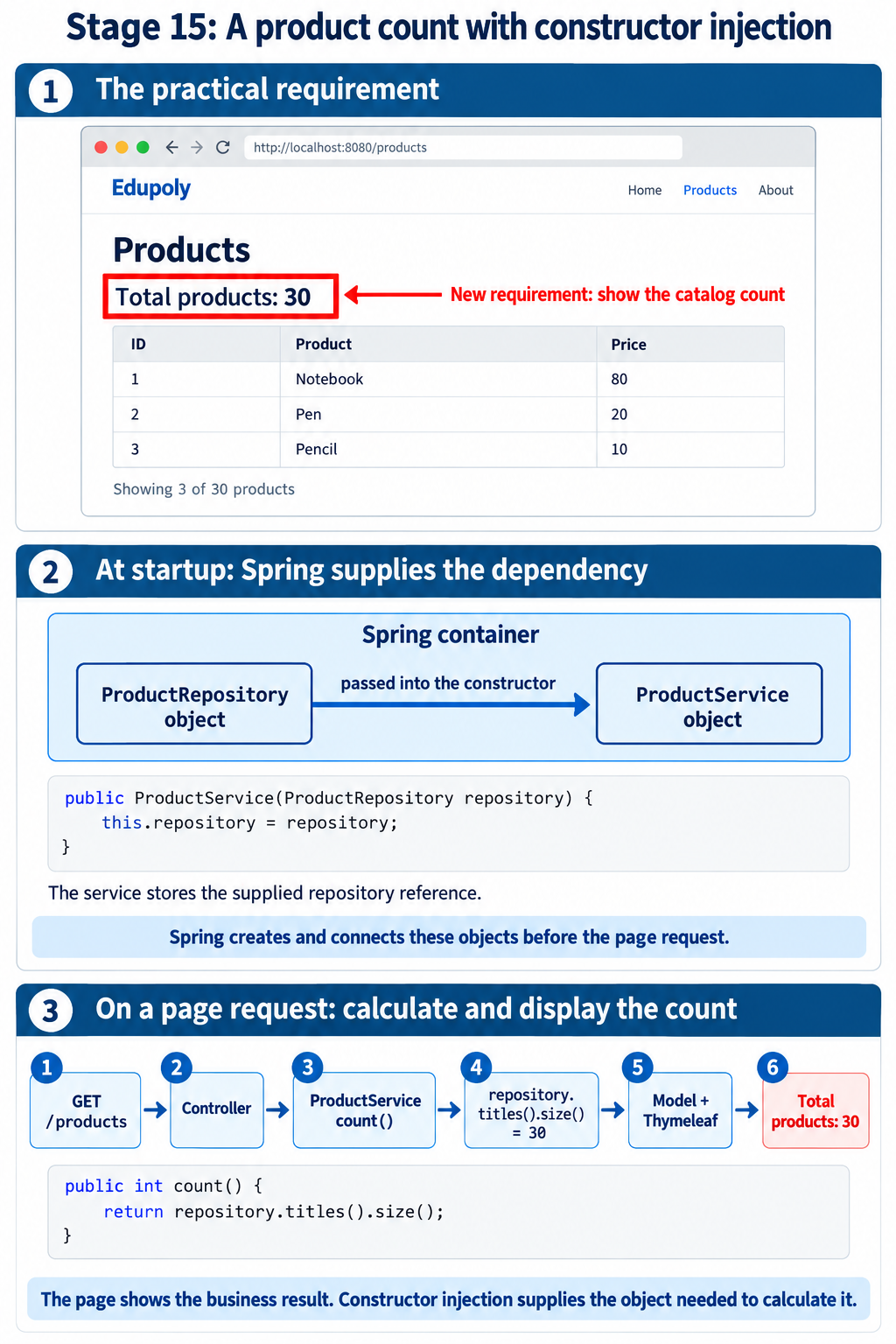
Stage 15 revisits that familiar mechanism. The new practical requirement is to display Total products: 30 above the existing product table. We trace the supplied repository reference through the code and practise supplying a dependency ourselves when testing.
Keep the familiar product table and add a red box showing Total products: 30. Follow how the service receives the repository it needs to calculate that count.
Open this stage in the online learning path
Before you start
Use JDK 21 or newer and Maven 3.9 or newer. Verify with java -version and mvn -version. Extract this project into its own folder; do not merge its files with another stage.
This lesson continues the earlier product catalog. Read the changed-file guide below before opening the complete files.
The practical requirement
We use the existing product data from products.txt and display the total count above the table, inside a red box. With the supplied file, the page shows Total products: 30.
Where the count feature is added: five files
The five files below contain the count helper, calculation, Model attribute, displayed value and styling. Passing the repository object into the service constructor is a mechanism we already used.
| File — jump to its complete source | Part to focus on |
|---|---|
ProductRepository.java | Add titles(), which supplies the names counted by the service. |
ProductService.java | Add count(). The repository field and constructor are reused concepts. |
ProductController.java | Add totalProducts to Model using service.count(). |
products.html | Display totalProducts inside the new count box. |
style.css | Add the .total-products rule for the red border and count styling. |
Reused: ProductService.java receives its repository
This constructor is the familiar injection mechanism. Spring supplies a ProductRepository object; the assignment stores its reference.
    private final ProductRepository repository;

    public ProductService(ProductRepository repository) {
        this.repository = repository;
    }
Added: ProductRepository.java
One title for each product.
    public List<String> titles() {
        List<String> titles = new ArrayList<>();
        for (Product product : products) {
            titles.add(product.getName());
        }
        return titles;
    }
Added: ProductService.java
Calculate the count using the supplied repository.
    public int count() {
        return repository.titles().size();
    }
Added: ProductController.java
Carry the calculated count to the view.
model.addAttribute("totalProducts", service.count());Added: products.html
Display the Model value.
<p class="total-products" id="total-products">Total products: <strong th:text="${totalProducts}">30</strong></p>Added: style.css
Draw the red count box.
.total-products{display:inline-block;border:3px solid #ef111f;border-radius:4px;padding:12px 18px;background:#fff7f7;color:#14213a;font-size:24px;font-weight:700;margin:4px 0 18px}The full project files remain below. The five count-feature files have yellow headings. Product.java, the product data and the details template are reused material; the other files provide project setup and the supporting injection comparison.
What we change and why
Reuse the existing file and reading method
The project includes the same data/products.txt file containing 30 product objects used by the earlier catalog lesson. ProductRepository opens its classpath resource as a stream and reads it with JsonMapper. That familiar file-reading approach is unchanged. The repository loads the array once when Spring constructs it.
Give the service a concrete dependency
ProductService needs ProductRepository to read those products. Its constructor declares ProductRepository repository as an argument. Spring creates the repository object and supplies its reference when constructing the service. The line this.repository = repository stores that reference; it does not create another repository or calculate the count.
Separate startup from a page request
At startup Spring discovers the repository, service and controller, creates their default singleton bean instances and supplies the constructor dependencies. In this example these objects are ready before a browser request arrives. Constructor injection does not run afresh for every request. Each request calls methods on the existing objects.
Calculate the count in the service
When the controller calls service.count(), the service uses its stored repository reference. repository.titles() returns one title for each product, and size() returns 30. The service also supplies the products for the existing table. The repository object is the injected dependency; the number 30 is the result of a later method call.
Carry the result into the template
The controller adds the array under products and the count under totalProducts in Model. It returns the view name products. Thymeleaf replaces th:text="${totalProducts}" with 30 and repeats the table rows. Model and Thymeleaf are familiar from the earlier catalog stages; the focus here is the constructor supplying the required repository.
Verify the count is calculated rather than hardcoded
In a fresh copy of the project, remove one complete product object from products.txt and keep the JSON valid. Restart the application because this example loads the file once at startup. The red box changes to 29 and the table contains 29 rows without changing the controller or template.
Keep the plain Java comparison as supporting practice
The test constructs ProductService directly with a supplied repository and checks its count without starting Spring. It also compares an unmanaged field-injected service, whose dependency remains null. The page itself uses only the constructor-injected service. A final repository reference cannot be reassigned, but it does not make every object reachable through that reference immutable.
Run this example
Open a terminal in the extracted folder containing pom.xml. Run one command at a time.
mvn test
mvn spring-boot:run
Open http://localhost:8115/products. Keep the terminal running. Stop with Ctrl+C. If the port is occupied, edit server.port in application.properties before restarting.
Expected result
Open http://localhost:8115/products
Red box: Total products: 30
Product table: 30 rows
More details: opens the selected product
After removing one valid product object and restarting: Total products: 29
Understand each complete file
Create the following files at exactly these paths, or use the ZIP. Source files include their imports. The test checks the behaviour described in the lesson.
pom.xml
<project xmlns="http://maven.apache.org/POM/4.0.0" xmlns:xsi="http://www.w3.org/2001/XMLSchema-instance" xsi:schemaLocation="http://maven.apache.org/POM/4.0.0 https://maven.apache.org/xsd/maven-4.0.0.xsd">
  <modelVersion>4.0.0</modelVersion>
  <parent><groupId>org.springframework.boot</groupId><artifactId>spring-boot-starter-parent</artifactId><version>4.1.1</version><relativePath/></parent>
  <groupId>com.edupoly</groupId><artifactId>spring-stage-15-constructor</artifactId><version>1.0.0</version>
  <properties><java.version>21</java.version></properties>
  <dependencies>
    <dependency><groupId>org.springframework.boot</groupId><artifactId>spring-boot-starter</artifactId></dependency>
    <dependency><groupId>org.springframework.boot</groupId><artifactId>spring-boot-starter-test</artifactId><scope>test</scope></dependency>
    <dependency><groupId>org.springframework.boot</groupId><artifactId>spring-boot-starter-webmvc</artifactId></dependency>
    <dependency><groupId>org.springframework.boot</groupId><artifactId>spring-boot-starter-thymeleaf</artifactId></dependency>
  </dependencies>
  <build><plugins><plugin><groupId>org.springframework.boot</groupId><artifactId>spring-boot-maven-plugin</artifactId></plugin></plugins></build>
</project>
src/main/java/com/edupoly/lesson/Product.java
package com.edupoly.lesson;

import java.math.BigDecimal;

public class Product {
    private int id;
    private String name;
    private String category;
    private BigDecimal price;
    private String brand;
    private int stock;
    private String description;
    private int warrantyMonths;

    public int getId() {
        return id;
    }

    public void setId(int id) {
        this.id = id;
    }

    public String getName() {
        return name;
    }

    public void setName(String name) {
        this.name = name;
    }

    public String getCategory() {
        return category;
    }

    public void setCategory(String category) {
        this.category = category;
    }

    public BigDecimal getPrice() {
        return price;
    }

    public void setPrice(BigDecimal price) {
        this.price = price;
    }

    public String getBrand() {
        return brand;
    }

    public void setBrand(String brand) {
        this.brand = brand;
    }

    public int getStock() {
        return stock;
    }

    public void setStock(int stock) {
        this.stock = stock;
    }

    public String getDescription() {
        return description;
    }

    public void setDescription(String description) {
        this.description = description;
    }

    public int getWarrantyMonths() {
        return warrantyMonths;
    }

    public void setWarrantyMonths(int warrantyMonths) {
        this.warrantyMonths = warrantyMonths;
    }
}
COUNT FEATUREsrc/main/java/com/edupoly/lesson/ProductRepository.java
Add titles(), which supplies the names counted by the service.
package com.edupoly.lesson;

import java.io.IOException;
import java.util.ArrayList;
import java.util.List;
import org.springframework.core.io.ClassPathResource;
import org.springframework.stereotype.Repository;
import tools.jackson.databind.json.JsonMapper;

@Repository
public class ProductRepository {
    private final Product[] products;

    public ProductRepository() throws IOException {
        var resource = new ClassPathResource("data/products.txt");
        try (var input = resource.getInputStream()) {
            JsonMapper mapper = JsonMapper.builder().build();
            products = mapper.readValue(input, Product[].class);
        }
    }

    public Product[] findAll() { return products; }

    public List<String> titles() {
        List<String> titles = new ArrayList<>();
        for (Product product : products) {
            titles.add(product.getName());
        }
        return titles;
    }
}
COUNT FEATUREsrc/main/java/com/edupoly/lesson/ProductService.java
Add count(). The repository field and constructor are reused concepts.
package com.edupoly.lesson;

import org.springframework.stereotype.Service;

@Service
public class ProductService {
    private final ProductRepository repository;

    public ProductService(ProductRepository repository) {
        this.repository = repository;
    }

    public Product[] findAll() { return repository.findAll(); }

    public int count() {
        return repository.titles().size();
    }
}
COUNT FEATUREsrc/main/java/com/edupoly/lesson/ProductController.java
Add totalProducts to Model using service.count().
package com.edupoly.lesson;

import org.springframework.http.HttpStatus;
import org.springframework.stereotype.Controller;
import org.springframework.ui.Model;
import org.springframework.web.bind.annotation.GetMapping;
import org.springframework.web.bind.annotation.PathVariable;
import org.springframework.web.server.ResponseStatusException;

@Controller
public class ProductController {
    private final ProductService service;

    public ProductController(ProductService service) {
        this.service = service;
    }

    @GetMapping({"/", "/products"})
    public String products(Model model) {
        model.addAttribute("products", service.findAll());
        model.addAttribute("totalProducts", service.count());
        return "products";
    }

    @GetMapping("/products/{id}")
    public String details(@PathVariable("id") int id, Model model) {
        for (Product product : service.findAll()) {
            if (product.getId() == id) {
                model.addAttribute("product", product);
                return "product-details";
            }
        }
        throw new ResponseStatusException(HttpStatus.NOT_FOUND, "Product not found");
    }
}
src/main/java/com/edupoly/lesson/FieldInjectedService.java
package com.edupoly.lesson;

import org.springframework.beans.factory.annotation.Autowired;
import org.springframework.stereotype.Service;

// Supporting comparison only; the product page uses constructor-injected ProductService.
@Service
public class FieldInjectedService {
    @Autowired private ProductRepository repository;
    public int count() { return repository.titles().size(); }
}
src/main/resources/data/products.txt
[
  {
    "id": 1,
    "name": "Wireless Mouse",
    "category": "Electronics",
    "price": 699,
    "brand": "EduTech",
    "stock": 12,
    "description": "Wireless Mouse for everyday learning, study and work. Product 1 includes a simple user guide and protective packaging.",
    "warrantyMonths": 12
  },
  {
    "id": 2,
    "name": "Mechanical Keyboard",
    "category": "Electronics",
    "price": 3499,
    "brand": "EduTech",
    "stock": 19,
    "description": "Mechanical Keyboard for everyday learning, study and work. Product 2 includes a simple user guide and protective packaging.",
    "warrantyMonths": 12
  },
  {
    "id": 3,
    "name": "USB-C Hub",
    "category": "Electronics",
    "price": 1599,
    "brand": "EduTech",
    "stock": 26,
    "description": "USB-C Hub for everyday learning, study and work. Product 3 includes a simple user guide and protective packaging.",
    "warrantyMonths": 12
  },
  {
    "id": 4,
    "name": "Laptop Stand",
    "category": "Electronics",
    "price": 1299,
    "brand": "EduTech",
    "stock": 33,
    "description": "Laptop Stand for everyday learning, study and work. Product 4 includes a simple user guide and protective packaging.",
    "warrantyMonths": 12
  },
  {
    "id": 5,
    "name": "Webcam",
    "category": "Electronics",
    "price": 2199,
    "brand": "EduTech",
    "stock": 40,
    "description": "Webcam for everyday learning, study and work. Product 5 includes a simple user guide and protective packaging.",
    "warrantyMonths": 12
  },
  {
    "id": 6,
    "name": "Bluetooth Speaker",
    "category": "Electronics",
    "price": 2499,
    "brand": "EduTech",
    "stock": 47,
    "description": "Bluetooth Speaker for everyday learning, study and work. Product 6 includes a simple user guide and protective packaging.",
    "warrantyMonths": 12
  },
  {
    "id": 7,
    "name": "Noise-Cancelling Headphones",
    "category": "Electronics",
    "price": 4999,
    "brand": "EduTech",
    "stock": 54,
    "description": "Noise-Cancelling Headphones for everyday learning, study and work. Product 7 includes a simple user guide and protective packaging.",
    "warrantyMonths": 12
  },
  {
    "id": 8,
    "name": "Portable SSD",
    "category": "Electronics",
    "price": 6499,
    "brand": "EduTech",
    "stock": 61,
    "description": "Portable SSD for everyday learning, study and work. Product 8 includes a simple user guide and protective packaging.",
    "warrantyMonths": 12
  },
  {
    "id": 9,
    "name": "USB Flash Drive",
    "category": "Electronics",
    "price": 599,
    "brand": "EduTech",
    "stock": 68,
    "description": "USB Flash Drive for everyday learning, study and work. Product 9 includes a simple user guide and protective packaging.",
    "warrantyMonths": 12
  },
  {
    "id": 10,
    "name": "Monitor",
    "category": "Electronics",
    "price": 12999,
    "brand": "EduTech",
    "stock": 15,
    "description": "Monitor for everyday learning, study and work. Product 10 includes a simple user guide and protective packaging.",
    "warrantyMonths": 12
  },
  {
    "id": 11,
    "name": "Desk Lamp",
    "category": "Electronics",
    "price": 899,
    "brand": "EduTech",
    "stock": 22,
    "description": "Desk Lamp for everyday learning, study and work. Product 11 includes a simple user guide and protective packaging.",
    "warrantyMonths": 12
  },
  {
    "id": 12,
    "name": "Power Bank",
    "category": "Electronics",
    "price": 1799,
    "brand": "EduTech",
    "stock": 29,
    "description": "Power Bank for everyday learning, study and work. Product 12 includes a simple user guide and protective packaging.",
    "warrantyMonths": 12
  },
  {
    "id": 13,
    "name": "Smartphone Stand",
    "category": "Electronics",
    "price": 399,
    "brand": "EduTech",
    "stock": 36,
    "description": "Smartphone Stand for everyday learning, study and work. Product 13 includes a simple user guide and protective packaging.",
    "warrantyMonths": 12
  },
  {
    "id": 14,
    "name": "HDMI Cable",
    "category": "Electronics",
    "price": 499,
    "brand": "EduTech",
    "stock": 43,
    "description": "HDMI Cable for everyday learning, study and work. Product 14 includes a simple user guide and protective packaging.",
    "warrantyMonths": 12
  },
  {
    "id": 15,
    "name": "Ethernet Adapter",
    "category": "Electronics",
    "price": 999,
    "brand": "EduTech",
    "stock": 50,
    "description": "Ethernet Adapter for everyday learning, study and work. Product 15 includes a simple user guide and protective packaging.",
    "warrantyMonths": 12
  },
  {
    "id": 16,
    "name": "Graphics Tablet",
    "category": "Electronics",
    "price": 3999,
    "brand": "EduTech",
    "stock": 57,
    "description": "Graphics Tablet for everyday learning, study and work. Product 16 includes a simple user guide and protective packaging.",
    "warrantyMonths": 12
  },
  {
    "id": 17,
    "name": "Microphone",
    "category": "Electronics",
    "price": 2999,
    "brand": "EduTech",
    "stock": 64,
    "description": "Microphone for everyday learning, study and work. Product 17 includes a simple user guide and protective packaging.",
    "warrantyMonths": 12
  },
  {
    "id": 18,
    "name": "Laptop Backpack",
    "category": "Electronics",
    "price": 1499,
    "brand": "EduTech",
    "stock": 71,
    "description": "Laptop Backpack for everyday learning, study and work. Product 18 includes a simple user guide and protective packaging.",
    "warrantyMonths": 12
  },
  {
    "id": 19,
    "name": "Screen Cleaner",
    "category": "Electronics",
    "price": 249,
    "brand": "EduTech",
    "stock": 18,
    "description": "Screen Cleaner for everyday learning, study and work. Product 19 includes a simple user guide and protective packaging.",
    "warrantyMonths": 12
  },
  {
    "id": 20,
    "name": "Mouse Pad",
    "category": "Electronics",
    "price": 299,
    "brand": "EduTech",
    "stock": 25,
    "description": "Mouse Pad for everyday learning, study and work. Product 20 includes a simple user guide and protective packaging.",
    "warrantyMonths": 12
  },
  {
    "id": 21,
    "name": "Notebook",
    "category": "Study Essentials",
    "price": 149,
    "brand": "StudyWorks",
    "stock": 32,
    "description": "Notebook for everyday learning, study and work. Product 21 includes a simple user guide and protective packaging.",
    "warrantyMonths": 6
  },
  {
    "id": 22,
    "name": "Ballpoint Pen Set",
    "category": "Study Essentials",
    "price": 199,
    "brand": "StudyWorks",
    "stock": 39,
    "description": "Ballpoint Pen Set for everyday learning, study and work. Product 22 includes a simple user guide and protective packaging.",
    "warrantyMonths": 6
  },
  {
    "id": 23,
    "name": "Water Bottle",
    "category": "Study Essentials",
    "price": 599,
    "brand": "StudyWorks",
    "stock": 46,
    "description": "Water Bottle for everyday learning, study and work. Product 23 includes a simple user guide and protective packaging.",
    "warrantyMonths": 6
  },
  {
    "id": 24,
    "name": "Desk Organizer",
    "category": "Study Essentials",
    "price": 449,
    "brand": "StudyWorks",
    "stock": 53,
    "description": "Desk Organizer for everyday learning, study and work. Product 24 includes a simple user guide and protective packaging.",
    "warrantyMonths": 6
  },
  {
    "id": 25,
    "name": "Reading Light",
    "category": "Study Essentials",
    "price": 699,
    "brand": "StudyWorks",
    "stock": 60,
    "description": "Reading Light for everyday learning, study and work. Product 25 includes a simple user guide and protective packaging.",
    "warrantyMonths": 6
  },
  {
    "id": 26,
    "name": "Calculator",
    "category": "Study Essentials",
    "price": 499,
    "brand": "StudyWorks",
    "stock": 67,
    "description": "Calculator for everyday learning, study and work. Product 26 includes a simple user guide and protective packaging.",
    "warrantyMonths": 6
  },
  {
    "id": 27,
    "name": "Whiteboard",
    "category": "Study Essentials",
    "price": 1299,
    "brand": "StudyWorks",
    "stock": 14,
    "description": "Whiteboard for everyday learning, study and work. Product 27 includes a simple user guide and protective packaging.",
    "warrantyMonths": 6
  },
  {
    "id": 28,
    "name": "Marker Set",
    "category": "Study Essentials",
    "price": 299,
    "brand": "StudyWorks",
    "stock": 21,
    "description": "Marker Set for everyday learning, study and work. Product 28 includes a simple user guide and protective packaging.",
    "warrantyMonths": 6
  },
  {
    "id": 29,
    "name": "Book Stand",
    "category": "Study Essentials",
    "price": 799,
    "brand": "StudyWorks",
    "stock": 28,
    "description": "Book Stand for everyday learning, study and work. Product 29 includes a simple user guide and protective packaging.",
    "warrantyMonths": 6
  },
  {
    "id": 30,
    "name": "Travel Mug",
    "category": "Study Essentials",
    "price": 649,
    "brand": "StudyWorks",
    "stock": 35,
    "description": "Travel Mug for everyday learning, study and work. Product 30 includes a simple user guide and protective packaging.",
    "warrantyMonths": 6
  }
]
COUNT FEATUREsrc/main/resources/templates/products.html
Display totalProducts inside the new count box.
<!doctype html>
<html lang="en" xmlns:th="http://www.thymeleaf.org">
<head>
    <meta charset="UTF-8">
    <meta name="viewport" content="width=device-width, initial-scale=1">
    <title>Products</title>
    <link rel="stylesheet" th:href="@{/style.css}">
</head>
<body>
<main>
    <p class="brand">Edupoly · Product catalog</p>
    <h1>Products</h1>
    <p class="total-products" id="total-products">Total products: <strong th:text="${totalProducts}">30</strong></p>
    <p>Select More details to see a product's complete information. The red box shows the number of products in the catalog.</p>
    <div class="table-scroll">
    <table>
        <thead>
        <tr><th>ID</th><th>Name</th><th>Category</th><th>Price (INR)</th><th>Action</th></tr>
        </thead>
        <tbody>
        <tr th:each="product : ${products}">
            <td th:text="${product.id}">1</td>
            <td th:text="${product.name}">Wireless Mouse</td>
            <td th:text="${product.category}">Electronics</td>
            <td th:text="${product.price}">699</td>
            <td><a th:href="@{/products/{id}(id=${product.id})}">More details</a></td>
        </tr>
        </tbody>
    </table>
    </div>
</main>
</body>
</html>
src/main/resources/templates/product-details.html
<!doctype html>
<html lang="en" xmlns:th="http://www.thymeleaf.org">
<head>
    <meta charset="UTF-8">
    <meta name="viewport" content="width=device-width, initial-scale=1">
    <title th:text="${product.name}">Product details</title>
    <link rel="stylesheet" th:href="@{/style.css}">
</head>
<body>
<main class="detail">
    <h1>Product details</h1>
    <h2 th:text="${product.name}">Wireless Mouse</h2>
    <dl>
        <dt>ID</dt><dd th:text="${product.id}">1</dd>
        <dt>Name</dt><dd th:text="${product.name}">Wireless Mouse</dd>
        <dt>Category</dt><dd th:text="${product.category}">Electronics</dd>
        <dt>Price (INR)</dt><dd th:text="${product.price}">699</dd>
        <dt>Brand</dt><dd th:text="${product.brand}">EduTech</dd>
        <dt>Stock</dt><dd th:text="${product.stock}">12</dd>
        <dt>Description</dt><dd th:text="${product.description}">Product description</dd>
        <dt>Warranty (months)</dt><dd th:text="${product.warrantyMonths}">12</dd>
    </dl>
    <a th:href="@{/products}">Back to products</a>
</main>
</body>
</html>
COUNT FEATUREsrc/main/resources/static/style.css
Add the .total-products rule for the red border and count styling.
body{margin:0;padding:28px 16px;background:#f5f7fb;color:#17253d;font:16px/1.6 system-ui,sans-serif}main{max-width:1100px;margin:20px auto;padding:28px;background:#fff;border:1px solid #dbe2ec;border-radius:12px}h1{margin-top:0}a{color:#2457a6;text-underline-offset:3px}.table-scroll{overflow-x:auto}table{width:100%;border-collapse:collapse}th,td{text-align:left;padding:12px;border-bottom:1px solid #dbe2ec}th{background:#edf3fc}tbody tr:hover{background:#f8faff}.detail{max-width:760px}dl{display:grid;grid-template-columns:160px minmax(0,1fr);gap:12px 20px;margin:24px 0}dt{font-weight:650}dd{margin:0;overflow-wrap:anywhere}@media(max-width:500px){main{padding:16px}dl{grid-template-columns:1fr;gap:4px}dd{margin-bottom:12px}}

.brand{color:#164aa5;font-weight:700}.total-products{display:inline-block;border:3px solid #ef111f;border-radius:4px;padding:12px 18px;background:#fff7f7;color:#14213a;font-size:24px;font-weight:700;margin:4px 0 18px}
src/main/java/com/edupoly/lesson/Application.java
package com.edupoly.lesson;

import org.springframework.boot.SpringApplication;
import org.springframework.boot.autoconfigure.SpringBootApplication;
@SpringBootApplication
public class Application {
    public static void main(String[] args) { SpringApplication.run(Application.class, args); }
}
src/main/resources/application.properties
server.port=8115
spring.application.name=spring-stage-15-constructor
src/test/java/com/edupoly/lesson/LessonTest.java
package com.edupoly.lesson;

import org.junit.jupiter.api.Test;
import static org.junit.jupiter.api.Assertions.*;
import org.springframework.context.annotation.AnnotationConfigApplicationContext;

class LessonTest {
    @Test void constructorSupportsOrdinaryJavaTesting() throws Exception {
        ProductRepository fake = new ProductRepository() {
            @Override public java.util.List<String> titles() { return java.util.List.of("Test product"); }
        };
        assertEquals(1, new ProductService(fake).count());
        assertThrows(NullPointerException.class, () -> new FieldInjectedService().count());
    }

    @Test void webPageShowsCalculatedCountAndAllProducts() throws Exception {
        try (var context = org.springframework.boot.SpringApplication.run(Application.class, "--server.port=0")) {
            var repository = context.getBean(ProductRepository.class);
            assertEquals(30, repository.findAll().length);
            assertEquals(30, context.getBean(ProductService.class).count());
            assertEquals(30, context.getBean(FieldInjectedService.class).count());
            int port = context.getEnvironment().getProperty("local.server.port", Integer.class);
            var client = java.net.http.HttpClient.newHttpClient();
            String base = "http://127.0.0.1:" + port;
            var response = client.send(java.net.http.HttpRequest.newBuilder(java.net.URI.create(base + "/products")).build(), java.net.http.HttpResponse.BodyHandlers.ofString());
            assertEquals(200, response.statusCode());
            assertTrue(response.body().contains("Total products: <strong>30</strong>"));
            assertTrue(response.body().contains("total-products"));
            assertFalse(response.body().contains("th:each"));
            long tableRows = java.util.regex.Pattern.compile("<tr(?:\\s[^>]*)?>").matcher(response.body()).results().count();
            assertEquals(31, tableRows); // One header plus 30 product rows.
            var details = client.send(java.net.http.HttpRequest.newBuilder(java.net.URI.create(base + "/products/1")).build(), java.net.http.HttpResponse.BodyHandlers.ofString());
            assertEquals(200, details.statusCode()); assertTrue(details.body().contains("Wireless Mouse"));
            var missing = client.send(java.net.http.HttpRequest.newBuilder(java.net.URI.create(base + "/products/999")).build(), java.net.http.HttpResponse.BodyHandlers.ofString());
            assertEquals(404, missing.statusCode());
            var css = client.send(java.net.http.HttpRequest.newBuilder(java.net.URI.create(base + "/style.css")).build(), java.net.http.HttpResponse.BodyHandlers.ofString());
            assertTrue(css.body().contains("border:3px solid #ef111f"));
        }
    }
}
Try a failure, then correct it
Remove @Repository from ProductRepository and restart. Spring cannot supply the repository to ProductService, so startup fails. Restore @Repository. A missing file or invalid JSON also prevents startup; restore the supplied products.txt. If port 8115 is occupied, change server.port in application.properties and use the new port in the browser.
Words you can now explain
| Word | Meaning in this example |
|---|---|
| Constructor injection | Spring passes a ProductRepository object into the ProductService constructor. |
| Dependency | The repository object that ProductService needs to obtain the product data. |
| Bean | The managed repository, service and controller instances used by this application. |
| Model and Thymeleaf — reused | Model carries totalProducts; Thymeleaf displays that number inside the red box. |
Practice assignment
Add one valid product object with a new ID to products.txt, restart and check that the count becomes 31 and the new row appears. Point to the constructor parameter, the stored repository reference, the line that calculates 31, the Model attribute and the template expression. Explain which steps happen at startup and which happen on a page request.